How To: Enable and Manage Mailman in NodeWorx
Note
Mailman is only available on EL7 and EL8 servers. It is no longer supported for InterWorx on EL9 servers.
Mailman is a software package that may be used to manage electronic mail discussions and e-newsletter lists.
From the NodeWorx control panel, users may enable Mailman on the server, manage the service status, and reset mailing list passwords.
Information on managing mailing lists in SiteWorx can be found here.
To Enable Mailman
Installing Mailman
Log in to the server at the CLI as root, either via SSH or from the terminal
Run the following command to install mailman
yum install mailman
Run the following command. This will manually run the InterWorx fively cron, which will add Mailman as an option in the GUI:
Alternately, wait until after the next fively cron runs to move onto the next steps. The fively cron runs every five minutes.
~iworx/cron/iworx.pex --fively
Creating the Default Mailing List
Log in to the server at the CLI as root, either via SSH or from the terminal
Run the following command:
/usr/lib/mailman/bin/newlist
Follow the prompts:
The name of the mailing list must be “mailman”, otherwise the Mailman service will not start
[root@server ~]#  /usr/lib/mailman/bin/newlist
Enter the name of the list: mailman
Enter the email of the person running the list: user@domain.com
Initial mailman password:
Hit enter to notify mailman owner...

[root@server ~]#
Enabling Mailman in NodeWorx
Log into NodeWorx from the browser (https://ip.ad.dr.ess:2443/nodeworx)
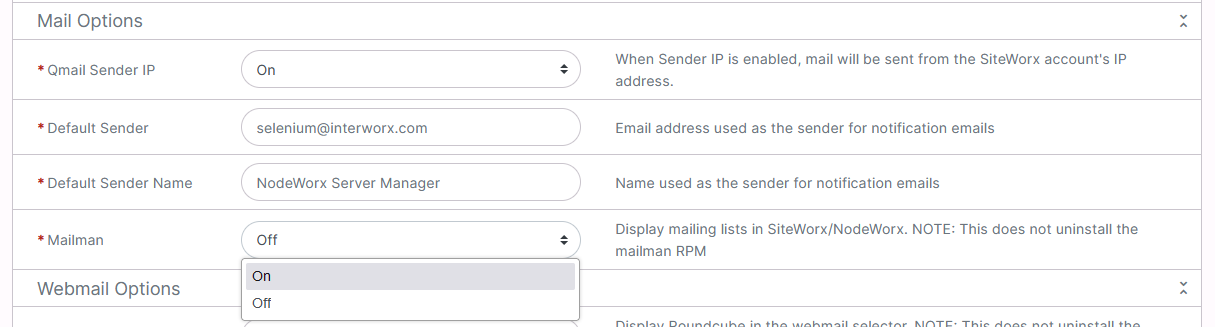
In NodeWorx, navigate to Server > Settings
Under Mail Options, select On from the Mailman dropdown
To Check the Status of the Mailman Service
Log into NodeWorx from the browser (https://ip.ad.dr.ess:2443/nodeworx)
In NodeWorx, navigate to System Services > Mail Server > Mailman

Under Mailman Service Control, the Mailman Status bar indicates the current status of the service
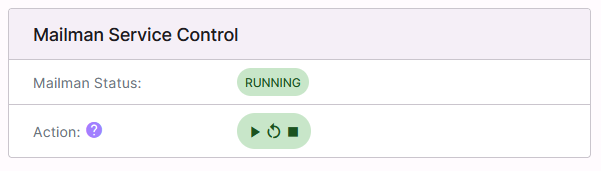
It is also possible to control the status of the service from this interface:
Play starts the service
Arrow restarts/refreshes the service
Stop stops the service
To Reset a Mailman List Password
Log into NodeWorx from the browser (https://ip.ad.dr.ess:2443/nodeworx)
In NodeWorx, navigate to System Services > Mail Server > Mailman
Under Mailman Password, select the list to update from the Mailman Lists dropdown
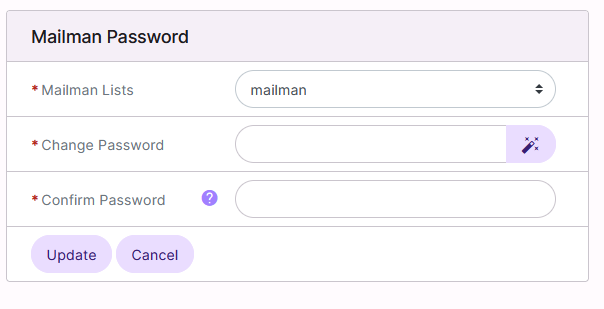
Update the Change Password and Confirm Password fields with the new password
Click Update