Note
You are viewing the documentation for an older release of Interworx (8.1). To see documentation for the current generally available release of Interworx, click here: 8.2.
How To: Enable Remote Assistance
Enabling Remote Assistance on a server allows InterWorx support technicians the ability to access the server securely, without the need to share the root password.
Enabling Remote Assistance can be accomplished either via the NodeWorx interface, or from the CLI.
Note
Enabling Remote Assistance is required when opening a support ticket at https://support.interworx.com. This allows the support technicians the ability to assist quickly and efficiently.
To Enable Via NodeWorx
Log into NodeWorx from the browser (https://ip.ad.dr.ess:2443/nodeworx)
In NodeWorx, navigate to Remote Assistance
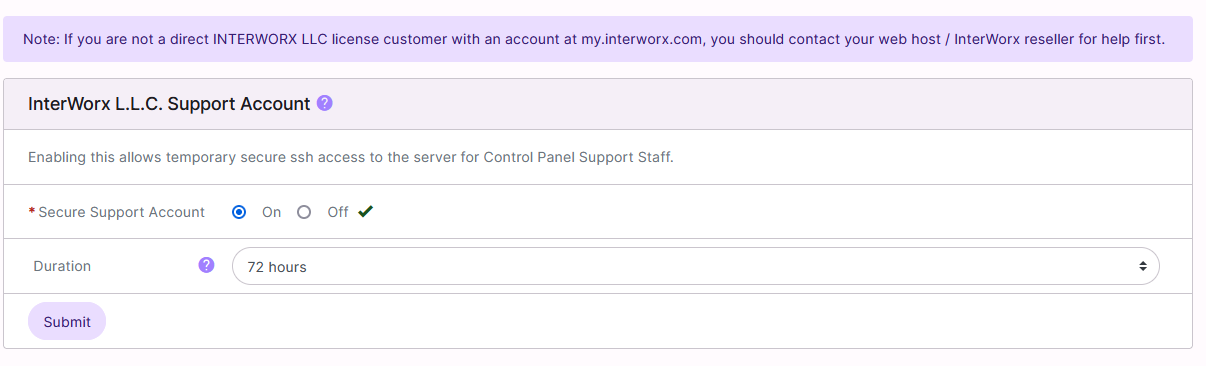
Next to Secure Support Account, select On
Select the desired duration from the Duration dropbox. The options are:
24 Hours
48 Hours
72 Hours (Default setting–recommended)
One Week
Click Submit
To Enable Via the CLI
Log in to the server at the CLI as root, either via SSH or from the terminal
At the CLI, run the following. This enables Remote Assistance for 72 hours:
~iworx/bin/enable-support-access.sh