How To: Enable and Use the SiteWorx Backups Cron Plugin
The SiteWorx Backup Cron plugin sets up a cron job to automatically back up all of the SiteWorx accounts on the server.
Enabling the SiteWorx Backup Cron plugin creates a cronjob in the root crontab similar to the following:
[root@server ~]# crontab -l
SHELL=/bin/sh
PATH=/root
MAILTO=admin@hostname.com
0 2 * * * sh /home/interworx/plugins/siteworx-backups-cron/scripts/iwx-backup.sh 4 3 2 /backup 5
[root@server ~]#
Daily backups that are created by the SiteWorx Backup Cron will be stored in the directory that is
specified in the plugin settings. Since they are not stored in the individual SiteWorx account default
backup folder (/home/{unixuser}/{domain.com}/iworx-backup), backups created by this plugin will not be
automatically viewable or restorable from within the SiteWorx or NodeWorx interfaces.
Backups that are created by the SiteWorx Backup Cron can be restored in two ways:
Move the desired backup file to the SiteWorx account’s default backup folder (
/home/{unixuser}/{domain.com}/iworx-backup), and then restore the backup from NodeWorx
To Create the Destination Directory
Log in to the server at the CLI as root, either via SSH or from the terminal
At the CLI, create the destination partition and mount. Default expected location is
/backupmkdir /backup
Note
It is recommended that the destination directory (
/backupby default) be on a dedicated backup drive or partition. Placing it on the primary drive can quickly lead to service interruptions and potential data loss if the primary partition runs out of space.
To Manage the Plugin
Log into NodeWorx from the browser (https://ip.ad.dr.ess:2443/nodeworx)
In NodeWorx, navigate to NodeWorx > Plugins
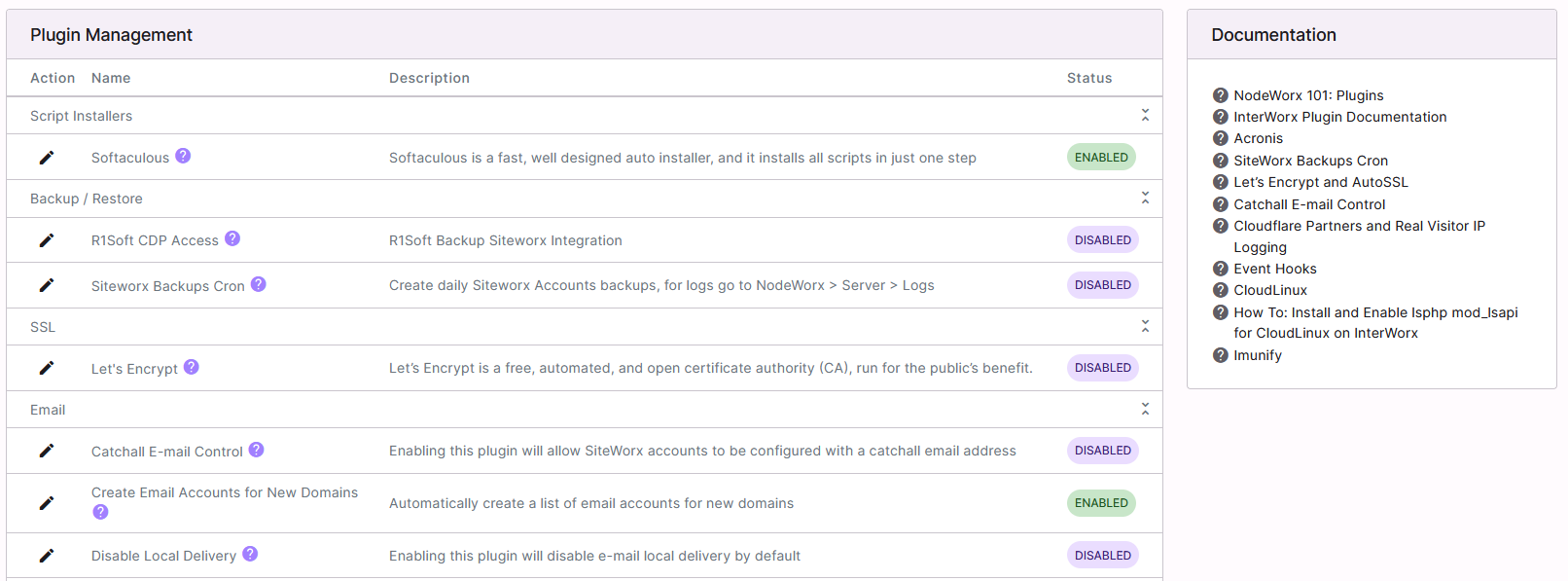
- Under Backup/Restore, click the Pencil Icon next to SiteWorx Backups Cron. This opens the SiteWorx Backup
Cron setup form

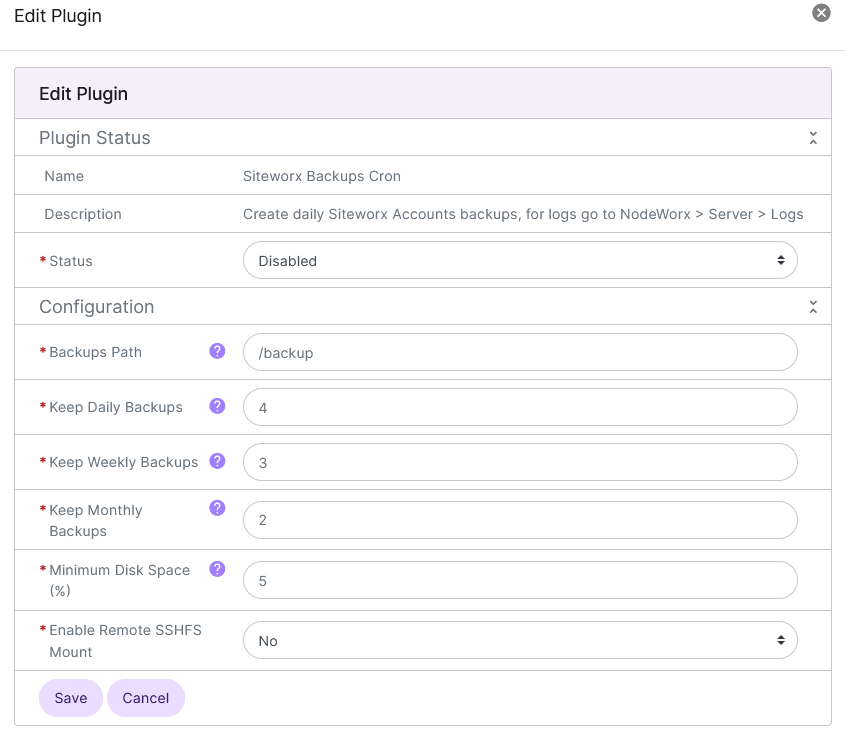
Update the required fields:
Status: Enables or Disables the plugin
Backup Path: The destination partition
Keep Daily: The number of daily backups kept on the server
Keep Weekly: The number of weekly backups kept on the server
Keep Monthly: The number of monthly backups kept on the server
Minimum Available Disk Space: The minimum percentage of disk space that must be available in order for the SiteWorx backup cron to run
If the backups are to be stored on a remote server, select Yes from the Enable Remote SSHFS Mount dropdown. This will expand the form to provide additional required settings:
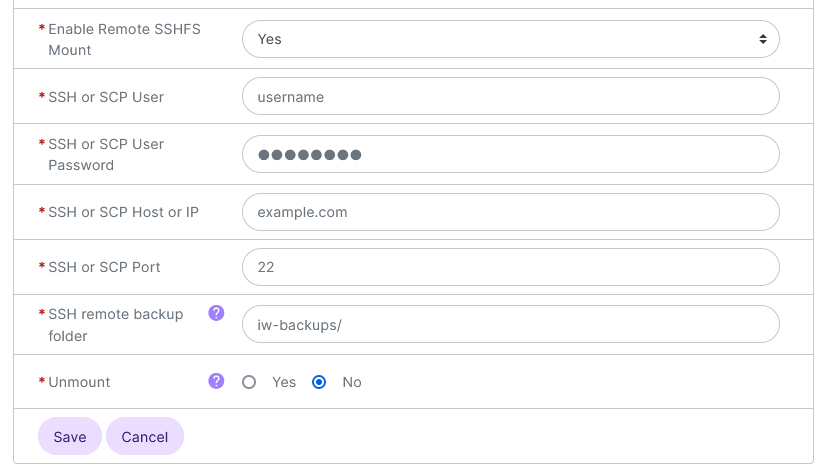
SSH or SCP User: The SSH or SCP username
SSH or SCP User Password: The SSH or SCP password for that user
SSH or SCP Host or IP: The hostname or IP of the remote server
SSH or SCP Port: The SSH or SCP port for the remote server
SSH Remote Backup Folder: The full path to the directory on the remote server where the backups will be stored. This folder must already exist. It will not be automatically created
Unmount: If Yes is selected the SSHFS remote folder will automatically be unmounted after the daily backup is complete
Click Save
Additional Options
Further customization may be set in /home/interworx/plugins/siteworx-backups-cron/scripts/iwx-backup.conf.
Customizable settings include:
Day to run Weekly backups
Day to run Monthly backups
Backup notification email
[root@server ~]# cat /home/interworx/plugins/siteworx-backups-cron/scripts/iwx-backup.conf
#!/bin/bash
# Conf changes to this file will not be lost in future updates.  New options will be appended to this conf file.
# Which Day to run Weekly Backups  (0..6); 0 is Sunday
DAY_WEEKLY="0"
# Which Day to run Monthly Backups  (1..31) 1 or 15 is best
DAY_MONTHLY="1"
#Backup Reporting - By default the current Server Admin Email is used, un-comment and set ADMIN_EMAIL if needed..
#ADMIN_EMAIL=""
[root@server ~]#
Note
The backup notification email defaults to the primary NodeWorx users email address. To override, uncomment ADMIN_EMAIL and add the desired email address to that line.
Using a Custom Temp Directory
Note
The ability to customize the SiteWorx Backup Cron Plugin temp directory was added in 8.1.10.
By default, the SiteWorx Backup Cron plugin creates a custom temp directory called /home/iwbktemp to use
while creating the backups. This directory can be changed by editing the siteworx-backups-cron-tmpdir
setting in ~iworx/iworx.ini.
Log in to the server at the CLI as root, either via SSH or from the terminal
At the CLI, using a text editor, open
~iworx/iworx.ini. The following example uses the Vim text editor:vim ~iworx/iworx.ini
Under the
[plugins.dir]heading, edit thesiteworx-backups-cron-tmpdirsetting. By default, it is set to/home/iwbktmp. Example:[plugins.dir] siteworx-backups-cron-tmpdir="/home/iwbktmp"
Save the file and exit the text editor