Note
You are viewing the documentation for an older release of Interworx (8.1). To see documentation for the current generally available release of Interworx, click here: 8.2.
How To: Manage Subdomains
Subdomains are domains with the format sub.mydomain.com.
By default, a subdomain’s docroot is set to use
/home/{unixuser}/{domain.com}/html/{sub}, replacing {sub} with the corresponding subdomain prefix. Subdomains
also inherit the PHP version of the parent domain. The docroot and PHP version for the subdomain can be customized
after creation.
To Add a Subdomain
Log into SiteWorx from the browser (https://ip.ad.dr.ess:2443/siteworx)
In SiteWorx, navigate to Hosting Features > Domains > Subdomain, either from the side menu or SiteWorx home

Click + or Add a Subdomain. This opens the Add a Subdomain form
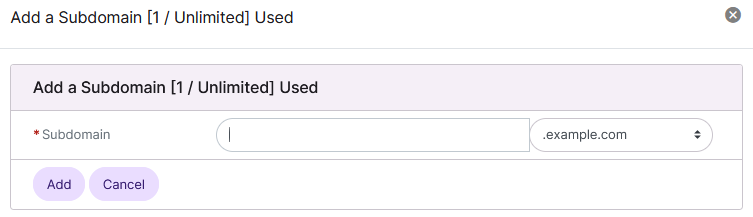
Select the desired domain from the dropdown and update the Subdomain field
Click Add
To Edit a Subdomain
Log into SiteWorx from the browser (https://ip.ad.dr.ess:2443/siteworx)
In SiteWorx, navigate to Hosting Features > Domains > Subdomain, either from the side menu or SiteWorx home
Click the pencil next to the subdomain. This opens the Edit Subdomain form
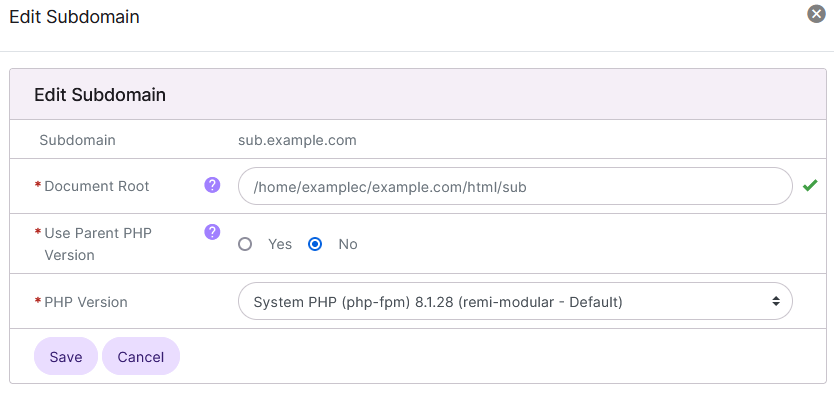
Update the desired fields
Document Root: The custom docroot for the subdomain
Use Parent PHP Version: Determines whether the subdomain uses the parent domain’s PHP version
PHP Version: The custom PHP version for the subdomain, if not using the parent domain’s PHP version
Click Save
To Delete a Subdomain
From the Subdomain List
Log into SiteWorx from the browser (https://ip.ad.dr.ess:2443/siteworx)
In SiteWorx, navigate to Hosting Features > Domains > Subdomain, either from the side menu or SiteWorx home
Next to Existing Subdomains, select the desired domain that the subdomain is under. By default, the subdomains for the master domain are shown. Selecting a secondary domain will refresh the page to show the subdomains for that secondary domain
Click the Trashcan next to the subdomain. This opens the Confirmation form
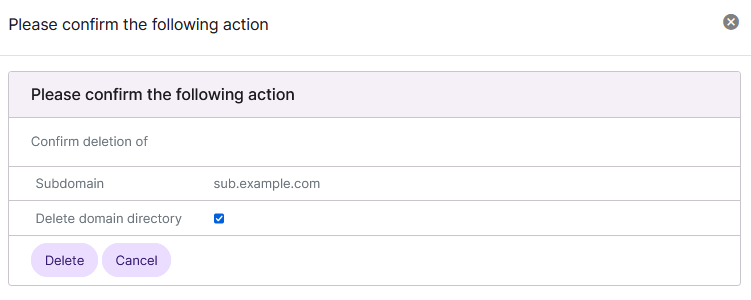
Click Delete
From the With Selected Dropdown
Log into SiteWorx from the browser (https://ip.ad.dr.ess:2443/siteworx)
In SiteWorx, navigate to Hosting Features > Domains > Subdomain, either from the side menu or SiteWorx home
Select the checkbox next to the domain(s)
Selecting the checkbox next to the With Selected dropdown will automatically select all domains
Select Delete from the With Selected dropdown
Click Go. This opens the Confirm Deletion form
Click Delete